In the modern digital economy, convenience is the ultimate currency. We live in a world of “one-click” shopping, instant food delivery, and monthly subscriptions that renew while we sleep. To make this seamless lifestyle possible, almost every website and app—from global giants like Amazon to your local boutique’s mobile app—asks a simple question: “Would you like to save this card for future purchases?”
For many, the answer is an instinctive “yes” because it removes the friction of digging through a wallet for a 16-digit number. However, for the security-conscious, this prompt triggers a wave of anxiety. Is your financial “DNA” now sitting in a vulnerable database? What happens if that company is hacked?
In this comprehensive guide, we will dive deep into the mechanics of modern payment security, the risks of saving your data, and the high-tech alternatives that allow you to enjoy convenience without sacrificing your financial safety.
The Mechanics of Modern Payment Security: How Your Data is Hidden

To understand if it’s safe to save your card, you first need to understand that most reputable companies don’t actually “save” your credit card number in the way you might imagine. In the early days of the internet, a merchant might have stored your card number in a simple text file—a nightmare for security. Today, the process is governed by PCI-DSS (Payment Card Industry Data Security Standard).
The Power of Tokenization
When you click “save,” most modern platforms use a process called Tokenization. Instead of storing your actual 16-digit card number and CVV code, the merchant sends that data to a secure payment processor (like Stripe, PayPal, or a major bank).
The processor “swaps” your real card info for a Token—a random string of alphanumeric characters. The merchant stores this token, not your card.
-
The Security Benefit: If a hacker breaches the merchant’s database, all they find are useless tokens. These tokens only work for that specific merchant and cannot be used elsewhere to make fraudulent purchases.
AES-256 Encryption: The Digital Vault
Furthermore, any data that is transmitted is protected by high-level encryption. AES-256 is the gold standard, often referred to as “military-grade encryption.” To put its strength into perspective, it would take the world’s most powerful supercomputers billions of years to crack a single piece of data protected by this standard.
Saving Cards in Browsers vs. Merchant Apps: Which is More Secure?
Not all “saved” cards are created equal. You generally have three places where your card data lives: inside a merchant’s app (like Uber), inside your web browser (like Google Chrome or Safari), or inside a digital wallet (like Apple Pay).
1. Saving with the Merchant (Amazon, Netflix, etc.)
This is the most common method. You are trusting the company to handle your data correctly.
-
Risk Level: Moderate. While giants like Amazon have world-class security, smaller “mom-and-pop” e-commerce sites may have vulnerabilities in their website code that could allow “form-jacking” (where a thief “sniffs” the data as you type it).
2. Saving in Your Browser (Autofill)
Chrome, Safari, and Firefox offer to save your card to “Autofill” forms.
-
Risk Level: Low to Moderate. Browsers usually require your device password, FaceID, or TouchID to reveal the card info. However, if you leave your laptop unlocked in a public place, someone could theoretically use your “Autofill” to go on a shopping spree.
3. Digital Wallets (The Gold Standard)
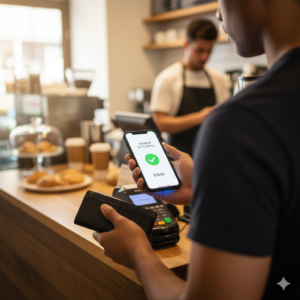
Apple Pay, Google Pay, and Samsung Pay are significantly more secure than both browsers and merchant databases. They use “Device Primary Account Numbers” (DPANs). Your real card number is never even shared with the merchant during the transaction. Every purchase is authorized by a biometric scan (your face or fingerprint).
The Dangers of Data Breaches: What Actually Happens to Your Card Info?
Despite the high-tech security mentioned above, data breaches still happen. In 2025 and 2026, we’ve seen that even large corporations are not immune to sophisticated phishing or social engineering attacks.
When a site is breached, hackers aren’t usually looking for your “tokenized” card. They are looking for your identity. A “full” profile (Name, Address, Email, and Card Info) is highly valuable on the Dark Web.
The Liability Safety Net
The good news for consumers—especially those in the United States—is the Fair Credit Billing Act (FCBA). If your saved card info is stolen and used fraudulently:
-
Credit Cards: Your maximum legal liability is $50, and most major banks offer Zero Liability policies. You are not responsible for the thief’s spending.
-
Debit Cards: The protections are much weaker. If you don’t report the fraud quickly, you could be liable for the entire loss. This is why you should NEVER save a debit card on a website or app.
Virtual Credit Cards: The Ultimate “Invisibility Cloak” for Online Shopping
If you want the ultimate level of security while still enjoying “one-click” convenience, you should be using Virtual Credit Cards.
Many modern banks and third-party services (like Privacy.com) allow you to create a “dummy” credit card number for specific merchants.
-
Merchant-Locked: You can create a virtual card that only works at Netflix. If a hacker steals that number and tries to use it at Best Buy, the transaction will be declined instantly.
-
Spend Limits: You can set a card to have a maximum limit of $20, ensuring a rogue subscription can never overcharge you.
-
Easy Deletion: If you want to cancel a service that makes it hard to “unsubscribe,” you can simply “kill” the virtual card.
The Risks of “One-Click” Purchases and Impulse Spending
Safety isn’t just about hackers; it’s also about your own financial discipline. When you save a card, you remove the “friction” of spending.
The Psychology of Friction
Financial psychologists have found that the few seconds it takes to find your wallet and type in a number act as a “cool-down period.” It gives your brain a moment to ask, “Do I really need this?” By saving your card, you allow your impulsive “lizard brain” to take over, which can lead to “subscription creep”—where you find yourself paying for ten different services you barely use because the barrier to entry was so low.
The “Kid” Factor
If you save your card on a tablet or gaming console (like a PlayStation or Xbox) that your children use, you are at risk of “accidental” fraud. We have all heard stories of parents waking up to thousands of dollars in “in-game currency” purchases. If you save a card on a shared device, always ensure Password Protection for Purchases is enabled.
Protecting Your Finances: Best Practices for High-Security Online Spending
If you decide to save your card for convenience, follow these non-negotiable rules to stay safe:
-
Use Multi-Factor Authentication (MFA): Always enable 2FA/MFA on any site where your card is saved. If a hacker gets your password, they still won’t be able to log in and use your saved card without the code from your phone.
-
Monitor Your Statements Weekly: Don’t wait for the end of the month. Use your banking app to scan for small “test” charges ($1.00 or less) which are often the first sign that your saved card info has been compromised.
-
Audit Your Saved Cards Annually: Once a year, go into your Google/Apple account or your Amazon settings and delete any cards that are expired or that you no longer use.
-
Avoid Public Wi-Fi: Never enter or save card details while connected to public Wi-Fi at a coffee shop or airport unless you are using a high-quality VPN.
-
Prioritize Credit Over Debit: As mentioned, the legal protections for credit cards are vastly superior. If a saved credit card is hacked, it’s the bank’s money at risk. If a saved debit card is hacked, it’s your rent and grocery money that disappears.
Is It Safe or Should You Delete Your Info?

The verdict for 2026 is that saving your credit card on major, reputable platforms is generally safe, provided you are using a credit card and have MFA enabled. The technology behind tokenization and encryption has made it incredibly difficult for hackers to steal usable financial data from large-scale databases.
However, “safe” does not mean “risk-free.” The biggest risks today aren’t the technology failing; it’s the human element—weak passwords, lack of 2FA, and the use of debit cards on insecure sites. By using digital wallets and virtual cards, you can enjoy the “one-click” future while keeping your real financial identity behind an impenetrable digital shield.